How to download songs on Spotify?
Spotify is a significant source for listening to music, but what if it’s possible for you? Yes, you can enjoy music with wifi and offline both. Podcasts and songs will be easy to download on Spotify. So whether you are on the travel, on the walk, or even if you are in another Country altogether, your favorite tunes will always be with you. I provided a step-by-step method for download songs on Spotify music. Firstly, open the Spotify app on your device. Then, explore your dearest song, albums, or artist. You want to download. Once you find it, click on the three dots for the next step. A menu will appear. Where you will select “download.” The song will start uploading. Now you will be able to listen. It is available for download without requiring an internet connection. Steps for downloading albums or artists’ playlists.
- Open Spotify on devices (mobile or desktop).
- Now search your dearest albums or playlists.
- Put all these songs in a particular playlist.
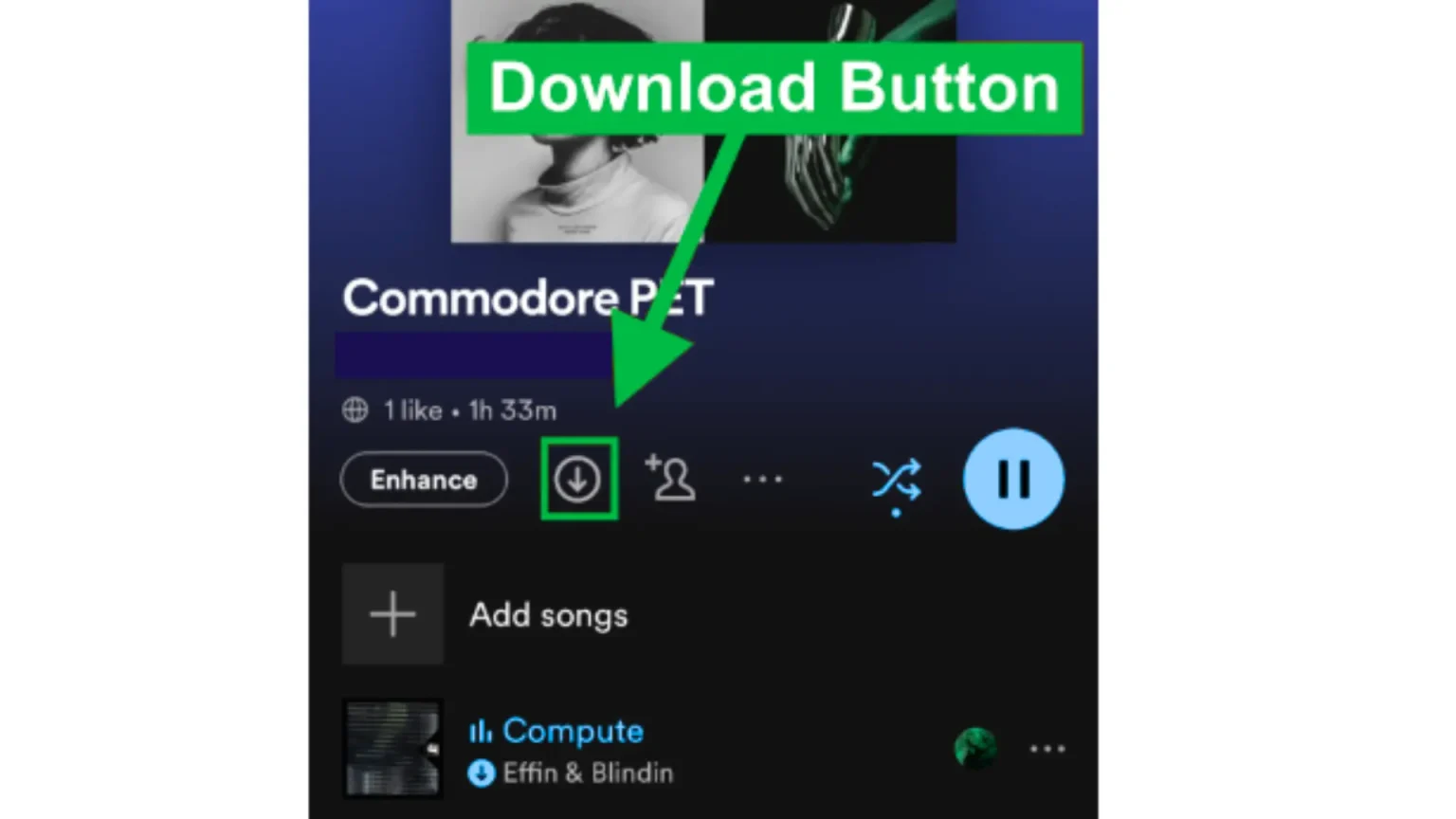
- A down arrow⬇️ shows on the homepage screen, which is used for continuing the downloading process. After doing it, you will be able to download songs or playlists individually. At this moment, Spotify is offering to listen to music without connecting to wifi.
Can you download music or songs on Spotify, in the free version?
No, you can not do it in the free version of their app. You will become a premium member of Spotify to download songs. In the premium version, it becomes easy to download preferred songs, playlists, podcasts, and albums. Furthermore, members can easily control devices used for downloading content.
Downloading limitation for premium users.
Spotify Premium Users have a download opportunity of around 10,000 songs on each of up to 5 devices for a single user. That means 50,000 songs downloaded at once. If you are a Spotify Premium user and you need help downloading songs, make sure to follow the above guidance.
How to download Spotify’s music on iPhone or Android phones?
Open the Spotify app on your mobile device. Then explore songs, albums, or artists’ playlists that you want to download. When complete, you’re adding the method at once. Now there is a down arrow button for playlists, which is easy to download on the device. Once it’s completed, you will be able to listen to music without any internet connection or in offline mode.
- Open the Spotify app on your mobile phone.
- Add all songs you want to download to a playlist.
- Once your favorite playlist is ready, click the down arrow button.
- Now your dearest music playlists are downloading.
How to download music on Spotify in desktop mode?
Open the Spotify app in desktop mode. Now search for the songs, albums, or artists that you want to download for listening. As you found it, click the three dots for the following process. A menu will show up where you choose to download. As this process is completed, you will be able to enjoy the precious music. Also, users access these without an internet connection.

How to download Podcasts on Spotify?
Podcasts are a significant source of entertainment. This is a digital audio file available on the internet for download to a mobile device, typically in series. These series are available on the Spotify app and are easy to load on mobile. After uploading, you can listen to it without an internet connection.
Below are some steps to follow for uploading it.
- Open the Spotify app on the device and then find the podcasts.
- After accessing it, click on the three dots.
- A pop-up will appear while downloading.
- Now podcasts start downloading.
- As it finishes, you will be able to listen to it offline.
Can you download from Spotify to MP3?
Un happily, you cannot download music from Spotify to MP3. Initially, the reason is that these song formats are not supported in MP3. Spotify formats are Ogg Vorbis for music, while MP3 has a compressed file format that has limited audio quality.
Final words:
The process of downloading and uploading music, playlists, and Podcasts on Spotify is a convenient and straightforward method, especially for Premium members. With just a few steps, you will be able to save your dearest music and enjoy it anytime, anywhere, without an internet connection, whether you are planning to travel, working out, or relaxing at home. In this planning, Spotify features ensure that music is always within your reach. Whether you’re traveling, working out, or relaxing at home, Spotify’s offline feature ensures that your music is always within reach.